Review: The Wireless BitTorrent router

Written by Ernesto on August 11, 2006 

I heard some stories about the Asus WL-700gE, aka “the BitTorrent router” a couple of months ago. It was announced as the ultimate gadget for torrent freaks, so I decided to buy one as soon as it was available. That was three weeks ago.

After two weeks of extensive testing I think I’m able to write a proper review (of the bt part). Lets start with a general overview of the specs:
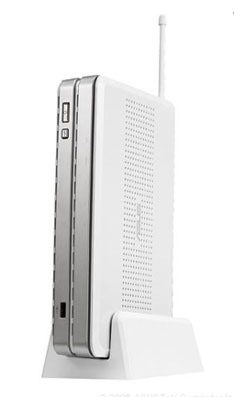
BitTorrent router asus
  • 160GB Built internal 3.5″ Hard Drive
  • 3 USB 2.0 ports
  • Web/FTP Server
  • Photo Album/Message Board Wizard
  • Auto bandwidth management (downloading + web browsing)
  • Plug ‘n Share USB Storage + RAID mirroring
  • iTunes Server + UpnP AV Server
  • Power usage (approx) 30watts peak (restarting router) and 15watts “idle”
  • and a lot more

    The router comes with a setup utility, thus configuring the router is pretty easy. The goal of this article is to review the BitTorrent related functionalities of the router, but I have to say that the router does pretty much everything it promises. To name a few things:

  • The Itunes server works like a charm, and is very useful if you want to access your mp3 collection with other gadgets or computers.
  • The FTP server allows you to create multiple users with separate access levels
  • The plug and play USB backup works like it should.
  • The Wireless signal is excellent, it has no problem to bypass the two steel-enforced concrete floors in my house.
  • asus BitTorrent

    But now the BitTorrent part. The Asus WL-700gE comes with a “download master” utility that supports ftp, http, and BitTorrent downloads. There are two ways to download torrents, you can upload a torrent with the “download master” utility on your pc or you can access the “download master” in your web browser.

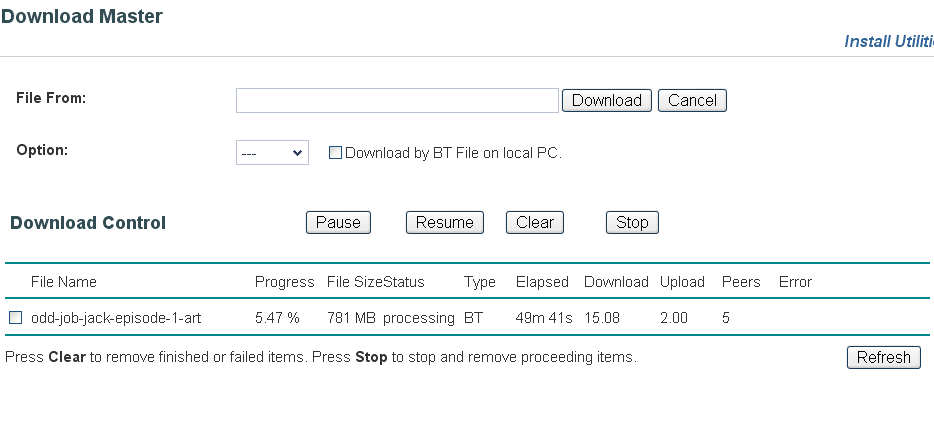
    The progress of the downloads can be monitored in the transfer panel of the download master. It lists the filename, progress, size, speed and ETA. The web-based download master has a few extra monitoring options (peers!, download/upload).

    Download Master

    dl master

    Web Download Master

    dl master

    The transfer monitoring is quite buggy, the speed and filesize update every 10 seconds or so, but the torrents have the strange tendency to stop downloading if you watch the transfer progress for more than a minute. They resume downloading as soon as you minimize the window.

    And there are more bugs. About 50% of all the torrents I paused, never resumed after the pause. This means I had to redownload all the data.

    The overall speed is ok, and it shouldn’t matter too much, since most people will use it to download torrents overnight.

    There is not much to tweak. The only option you have is to set the time the torrent should seed once the download is finished (default is 1 hour). Too bad they didn’t include a ratio seed setting.

    Conclusion:
    Overall I would say the router performs very well and is worth the money (I paid approximately $300). However, the BitTorrent client is very buggy and limited. It works but it could and should be improved significantly. The router would not yet replace my regular torrent client, but it does the job at night.

    pro’s:

  • torrent downloads work (sometimes)
  • all the other features are sweat
  • con’s

  • transfers stop at random
  • files disappear
  • tweaking options are limited
  • If you don't like torrents try MP3 Fiesta. They hold nearly 67,000 albums from nearly 17,000 artists. Prices are around the $0.10 mark for single tracks with full albums coming in at roughly $1.00. Tracks are available from 192kbps and they take major credit cards and PayPal

    Previously: Yet another social BitTorrent client

    Next: TorrentFreak welcomes Mathias

    42 Responses (Add yours or TrackBack)

    Pages: [1] 2 » Show All

    1 Aug 11, 2006 at 02:26 by jon

    Oh man this sounds awesome! Even if the bittorent features are buggy everything else sounds great! Too bad i don’t have enough money to get one :(

    2 Aug 11, 2006 at 12:58 by killingfrost

    well i guess if you had installed an alternative firmware like OpenWRT (wich works on most Asus routers) you could have used the original bittorrent client and written your own monitoring page.
    the idea is good but i do exactly the same with my WRT54G (60 euros new,35-40 euros on Ebay). bittorrent is running on the router and the files are saved on my hard drive via Samba. I do the monitoring with an ncurses console via SSH.

    3 Aug 11, 2006 at 13:39 by dj_torell

    too bad you can’t hack it to use utorrent, that would be amazing!

    4 Aug 11, 2006 at 14:06 by Ernesto

    @Killingfrost

    OpenWRT doesn’t work on this router yet afaik. But sure, you can fabricate someting similar yourself if you have the skills. But the 64mb RAM on the router is nice though.

    5 Aug 11, 2006 at 14:23 by Tim

    How many watts does it draw?

    6 Aug 11, 2006 at 14:32 by Macslut

    Are there any features that aren’t compatible with OS X (specifically a MacBook Pro)?

    Is the internal drive 2.5″?

    7 Aug 11, 2006 at 14:41 by Dartrunner

    DC Adapter AC Input: 100V~240V(50~60HZ)
    DC Output: 12V with max. 3 A Current

    Specs on the power supply, so it is not more than 36w plus the power supply loss (2 - 3 watts on this size). I would guess 10% oversize on the power supply so a really rough guess of 35W and that would be with the HD running. It will be less if the HD sleeps.

    8 Aug 11, 2006 at 15:40 by Ernesto

    I did a quick measure, and Dartrunner is right…
    30watts peak (restarting router)
    15watts “idle”

    and Macslut, I have no idea. The hard disk is 3.5″

    9 Aug 11, 2006 at 16:07 by Tim

    15 watts idle is pretty nice. I have a Compaq that is some kind of weird laptop-made-into-workstation that is a PIII 500MHz with a 20GB drive (all I have lying around) and 256MB of RAM. It pulls 35 watts and is what I consider my “green” computer (compare to 280 watts for my “good” computer). This little router does all my green machine does, for less watts.

    10 Aug 11, 2006 at 17:23 by Lee

    Any idea if I can shove an already formatted drive in there?

    And if so… could it be HFS formatted?

    Since it’s linux, I know it’s technically possible - but has ASUS been forward thinking enough to include support for it?

    11 Aug 11, 2006 at 17:43 by Ernesto

    @Lee

    Replacing the Hard Drive is not a problem
    The router recognizes the new drive if you run the firmware restoration tool
    However, this will REFORMAT the drive

    12 Aug 11, 2006 at 18:06 by eggman

    Anyone know if you can sync your iPod to this? Or if it just shows up as shared directory in iTunes, in which case I would assume you could not sync your iPod to it.

    13 Aug 11, 2006 at 18:45 by killingfrost

    it has only 2 Mb flash so it is probably to tight to fit a linux firmware but anyway some ppl managed it. check http://wiki.openwrt.org/OpenWrtDocs/Hardware/Asus/WL700gE there is a link to a forum thread about this.

    14 Aug 12, 2006 at 05:39 by jcy

    *sweet

    15 Aug 13, 2006 at 16:02 by dsanon

    What version of firmware is installed?

    16 Aug 13, 2006 at 18:00 by Ernesto

    @dsanon

    The most recent version…

    17 Aug 22, 2006 at 17:29 by nick

    does anybody know where one can actually _get_ one of these in the U.S.? nobody, and i mean nobody, that i can find on the internet has these in stock. *sob*

    18 Nov 15, 2006 at 18:56 by Tobbe

    Hello there,
    This router sounds very interesting. I have been thinking that i shall buy Asus WL-500G Premium, the difference between that and the WL-700gE is the harddrive or?
    Important question is how does i work to upload bittorrent with “download master”?
    Because for me is more important to be able to shut off the pc while i upload then download.It takes time to upload and get a good ratio after you have been download.

    Kjerag

    Pages: [1] 2 » Show All

    Add your response

    It takes approximately 1 minute for your comment to appear on TorrentFreak after it's posted.